| A Vista vs. Linux Matchup - Part 4: Software Wars - Bundled Apps |
by Steven J. Vaughan-Nichols (Feb. 21, 2007)
Foreword: This is Part 4 of a series that pits Microsoft's new Vista OS against MEPIS, a Ubuntu-based Linux distribution. When we last left our fearless curmudgeon, he had his system dual-booting Vista and MEPIS. In this episode, he compares the operating systems' bundled games, browsers, and instant communications applications.
Note: In case you missed the previous installments of this series, you can catch up on what you missed here:
A Vista vs. Linux Matchup
Part 4: Software Wars -- Bundled Apps
by Steven J. Vaughan-Nichols
Spread the word:
digg this story | |
To get you up to speed, here's where we are in my evaluation of Vista vs. Ubuntu/MEPIS Linux. When we left off, I had the system up and running in a dual-boot environment.
In the last episode, the question was how each operating system would work, or not, with the hardware on my HP Pavilion Media Center TV m7360n PC. The answer was that neither OS worked perfectly with the computer, but Ubuntu/MEPIS -- yes, the Linux system -- actually worked better with the PC than did Vista. In no small part, that was because Vista's built-in DRM (digital rights management) gets in the way of viewing or listening to high-quality video or music.
In this episode, I turn my attention to the software that both OSes include in their standard packages. Since I was using Vista Ultimate, the Vista with all the bells and whistles, I should note that it has more applications built in than its siblings. Similarly, MEPIS, a professional-grade adaptation of Ubuntu, comes with more applications than a vanilla Linux distribution, although with less than some Linuxes, such as Novell's openSUSE or SLED (SUSE Linux Enterprise Desktop), or Xandros's Professional Linux desktop.
You can, of course, add software to both operating systems, but that's the subject of the next episode in this series. Today's topic is what you get in the box, or download as part of the system.
Games
OK, let me make myself clear. We are not talking World of Warcraft or Elder Scrolls IV: Oblivion; we're talking Solitaire and Hearts.
When it comes to mindlessly burning the hours in the office, both distributions come with a fine selection of games. For me, MEPIS 6.01, which comes with the KDE-version of Sudoku, takes the brass-ring for best time-waster.
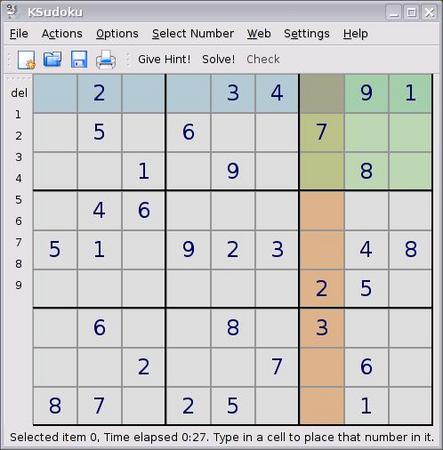
Just when you thought you couldn't waste any more time with built-in games, MEPIS, via KDE, gives you Soduku.
On the other hand, Vista does boast prettier versions of such old classics as Minesweeper.

Of course, there's always Minesweeper on Vista. But, now you can make your minefields bigger and, I guess, better.
Regardless of which OS you favor, both will give you many ways to wend away the minutes until lunch.
Web browser
With Vista you get just one choice of Web browser: Internet Explorer 7. I have no great fondness for IE 7. In part, that's because I have to use several IE-specific sites... that won't work with IE 7. Oh the irony!
I'm far from the only one who's discovered that Vista and IE 7 won't work with their existing work-related websites. Additionally, I've heard from dozens of users that they're now unable to use Citrix remote desktops with Vista and IE 7.
The problem here is that the Citrix ICA Client uses an ActiveX Control that won't work with IE 7's Protected Mode on Vista. The only work-around that I can find from either Microsoft or Citrix is to right-click the Internet Explorer icon and select "Run as administrator." This allows the ActiveX control to run. It also, of course, blows away Vista and IE 7's supposedly improved security.
Another Citrix problem with the IE 7 and Vista pairing is that CPM (Citrix Password Manager) 4.5 doesn't work at all. I've heard from several ticked-off enterprise Citrix administrators that they haven't received any kind of fix for this problem, and that they still don't know when they will get one.
For many users, Citrix problems don't exist at all. However, for many business users, Citrix is a mission-critical application.
Still, at least, my IE 7 title bar is showing English characters. My good friend and colleague, Wayne Rash, reports that his title bar is presenting him with Chinese characters on his Vista installation. No, we're not kidding.
I also ran into an odd little problem of my own. When I tried to print emails with the message headers from Outlook 2003, the messages wouldn't print. Microsoft has released a hotfix for this problem, and while it worked for me, it may not work for you. Unless this is being a real pain for you, Microsoft recommends that you wait for the "next service pack for Windows Internet Explorer 7 that contains this hotfix."
MEPIS, meanwhile, comes equipped with both Firefox 1.5.0.9 and Konqueror 3.5.3 browsers. While neither are the newest Linux browsers on the block, both do just fine. In particular, Firefox works well with many sites that favor IE.
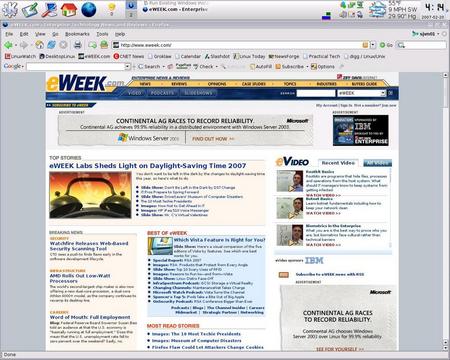
MEPIS, Windows, whatever -- give me Firefox when it comes to Web browsing.
(Click to enlarge)
Rather than waste your time telling you how wonderful Firefox is, suffice it to say that I run that browser on every system I have: Vista, Linux, FreeBSD, whatever. Even if you will never, ever run Linux, give Firefox a try. For me, it's simply the best browser I've ever used, and I might add, my first "browser" was telnet on Unix to info.cern.ch in 1992.
If you do have a site that's IE 6-specific and IE 7 won't do the job, since MEPIS comes with WINE (the open-source implementation of the Windows 2000 and 98 application programming interface), you can install IE 6 on Linux more easily than you can on Vista. Actually, I'm not sure you can install IE 6 on Vista.
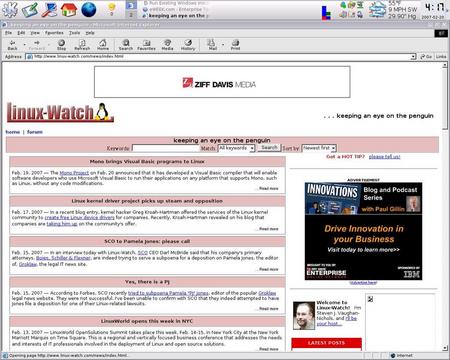
If you have to have IE 6, MEPIS and Ubuntu, thanks to WINE, actually make it easier to get to that browser than Vista does.
(Click to enlarge)
There are many easy ways to get IE, or other Windows programs, to work on Linux. If you want support, pay for CodeWeaver's Crossover Linux. If that's not a consideration, WineTools also makes installing Windows programs on Linux easy. I might add that with IE 6 on MEPIS, I was able to use my IE 6-specific sites, and could also run, in a test mode, the Citrix ICA client.
Email
For email, Vista comes with Windows Mail, aka the next generation of Outlook Express. This is one update that I consider to be a real update. The program now stores mail messages as individual files instead of in a single, easy-to-corrupt database file. With account setup information now stored in the mail database itself, instead of the registry, moving Windows Mail, and its messages, from one system to another has become much easier.
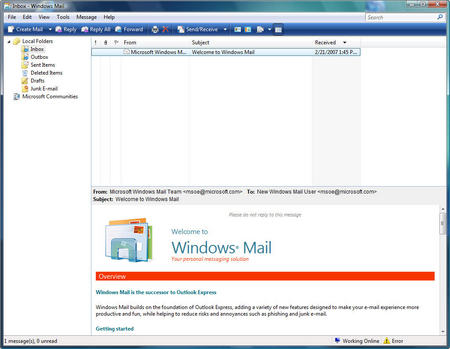
The new Vista email client, Windows Mail, isn't just a pretty face; it's far better than any version of Outlook Express, which preceded it.
(Click to enlarge)
The program also has a vastly improved Bayesian junk-mail filter with top-level domain and encoding blocking. With this, Microsoft finally has an email client that does a decent job of blocking spam.
That's all very nice, but Vista still doesn't equal MEPIS. The reason? MEPIS 6.01 comes not merely with an email client that's just as good in my opinion, the open-source Thunderbird 1.5.0.9 and the solid KMail 1.9.3, but the best email client on the planet: Novell's Evolution 2.6.1.
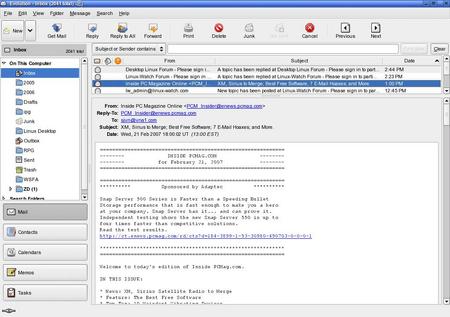
Unfortunately for Microsoft and Vista, Windows Mail is in no way, shape, or form the equal of Evolution.
(Click to enlarge)
Evolution is to an email client, what a Rolls-Royce is to a car. Besides being an email client that can work with the usual Internet mail protocols -- POP, IMAP, and SMTP -- it can also work with Microsoft Exchange 2000 and 2003's MAPI (Message Application Programming Interface).
Evolution also is a full-featured groupware client. You can use it to maintain calendars across Exchange, CalDAV, and iCal-calendar services. I, for example, use CalDAV to keep my local Evolution calendar in sync with my Web-based Google Calendar.
With Evolution, I can also use both a personal contact list and access LDAP-based (Lightweight Directory Access Protocol) directories. Throw in a good memo and task manager, and you have one great groupware program.
What's that you say? You can do most of that with Outlook 2003 or Outlook 2007? Yes, that's right, but with MEPIS you don't need to pay for that level of functionality. It's built in. Windows Mail is a big step up from Outlook Express, but it's no Outlook.
Instant communications
Oddly, and I do mean oddly, Microsoft decided not to bundle an IM (instant message) client in Vista. Windows Messenger, the XP IM client, is history. It does come with a link to download Windows Live Messenger, the IM client formerly known as MSN Messenger.
This move seems to be part of Microsoft's ill-conceived "When in doubt, slap Live on the name" branding campaign.
Once downloaded, Windows Live Messenger 8.1 is a full-featured IM client. Besides IM, both with the Microsoft and the Yahoo IM networks, Live Messenger supports video-conferencing and VoIP (voice over Internet protocol). If you want to use it as part of a business-only IM network, you'll need to buy Windows Server 2003 for its Active Directory services and Live Communication Server.
MEPIS, like the rest of the Linux family, splits out this functionality. For IM proper, MEPIS uses Gaim 1.50a. Gaim supports most IM protocols -- including but not limited to AIM, MSN, Yahoo, Jabber, and ICQ -- so no matter what IM network your friends and business partners are on, you'll be able to reach them.
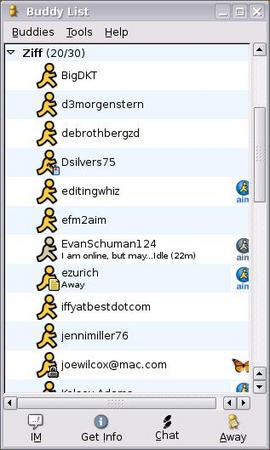
With a lot of my work comrades on AIM, Gaim on MEPIS makes far more sense for me than Microsoft's Windows Live Messenger.
For VoIP, MEPIS comes with Skype 1.3.0.53. This may appear to Windows users to be woefully out of date, since the Windows version is now 3.0, but it's actually the newest Linux version, released last October. Skype for Linux, however, doesn't support video.
If you want video-conferencing with MEPIS, you're going to need to go outside the installed and commonly supplied software stack. For those who want to give it a try, I've found that Ekiga, formerly GnomeMeeting, works well. When it comes to video-conferencing, in general, with Linux, Webcam support is still sketchy. Brave users can start with the Ubuntu Web cam wiki listings.
I see this IM and other instant communications as being a dead heat between Vista and MEPIS. If you need IM with users on AIM or a multitude of other IM networks, MEPIS is the better choice. On the other hand, if video-conferencing really is important to you, Vista's the better choice.
Software matchup, so far
In balance, though, up to this point, I still see MEPIS as being the software leader. Not only does it give you better programs -- Firefox and Evolution -- it offers you more choice from the moment you fire it up on your PC.
Next up, I take a look at the two operating system's default offerings in multimedia, office applications, security, and utilities. See you then.
-- Steven J. Vaughan-Nichols
Do you have comments on this story?
Talkback here
NOTE: Please post your comments regarding our articles using the above link. Be sure to use this article's title as the "Subject" in your posts. Before you create a new thread, please check to see if a discussion thread is already running on the article you plan to comment on. Thanks!
Related stories:
(Click here for further information)
|
|
|
|
|
|
|
|


